
Employees · 2 minutes reading time
Deregister an employee cell phone
Share employee access with a new device without deleting the employee or their previous work.
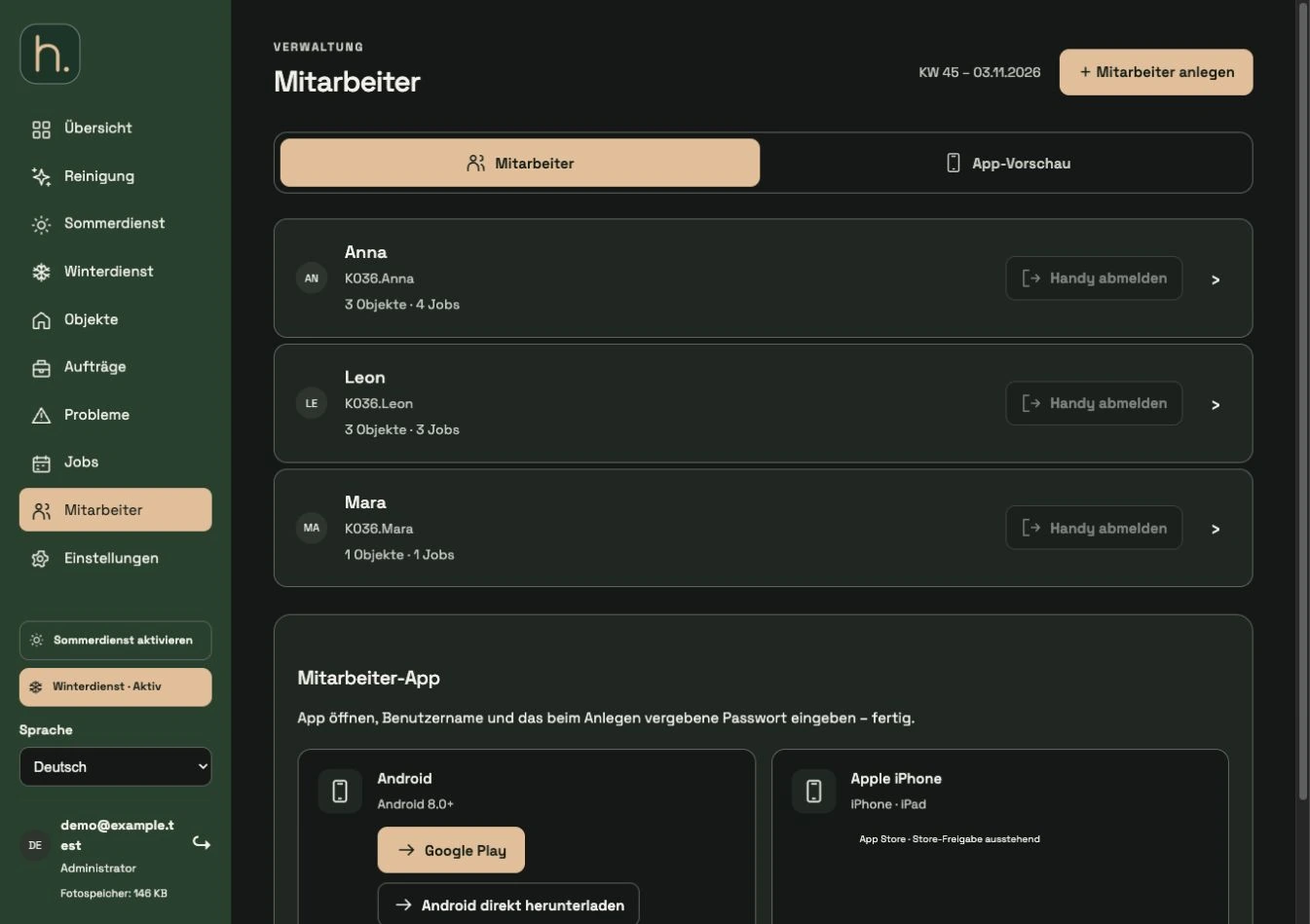
Identify employees
Open Employees and find the right person. In the overview there is a Deregister mobile phone button next to the employee.
Arrange device changes
Access is provided for a cell phone. If a device is lost, replaced or no longer available, the old binding must be released.
Deregister mobile phone
Press the button for the relevant employee. The same function is also available in the editing area under mobile phone access.
Read confirmation
Wait for the message that the phone has been deregistered. A disabled button may mean that no phone is currently linked.
Register new cell phone
Have the employee log in on the new device with their access data. Only after successful registration will the account be reconnected to a cell phone.
Note saved accesses
After an administrative logout, an old saved login cannot simply continue to be used. Access must be registered again with valid access data.
Frequently asked questions
The app reports that the account is already in use. What helps?
First check whether the access is still tied to another cell phone. Release exactly this employee account via Log out of your mobile phone.