
Properties & Customers · 2 minutes reading time
Create a new property
Create a fixed work location with service, address, customer, employee instructions and responsibilities.
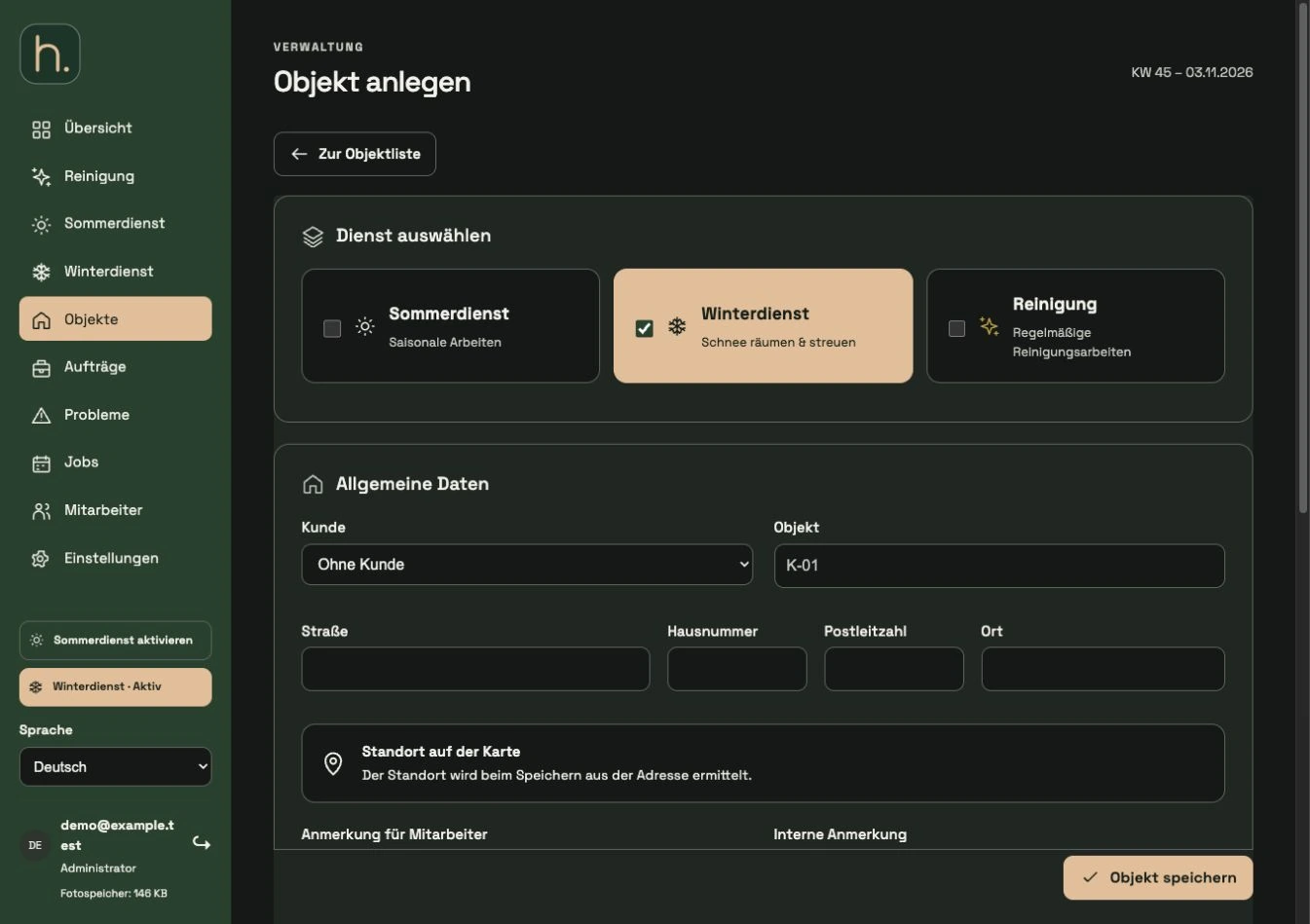
Open property form
Under Properties, click + Create Property. An property is a location that is serviced on a recurring basis. For one-off work with your own address, the Orders menu item is also available.
Choose service
Select summer service, winter service or cleaning. Summer service and winter service are mutually exclusive for individual properties. Cleaning can be activated in addition to the selected seasonal service.
Specify title and customer
Select the client in the Customer field and assign an easily recognizable property name. You can maintain the title and address independently of each other.
Enter full address
Enter the street, house number, zip code and city in the fields provided. The data is used for location search and navigation. Check the spelling and zip code particularly carefully.
Add notes and employees
Enter mission-relevant information in Note for Employees. Internal note is intended for administration. Then select the responsible employees and the services offered.
Save and check
Save the property. Then check the determined map location and open the property again to add plans, images or jobs.
Frequently asked questions
Can an property only have cleaning?
Yes. Enable cleaning without a seasonal service. The property is then moved to the cleaning area.